What are the best iPhone settings for sunset photos?
Use the standard Photo mode, tap the bright sky beside the sun, then drag exposure down a little until the colors deepen. Tap and hold to lock it. Use your iPhone's built-in lenses instead of pinching past them, turn on the grid, and brace the phone or use a tripod once Night mode appears after sunset.
That's most of it. The settings below change with what you're shooting, and they matter less than when you shoot. We built the comparison from how the iPhone Camera app works and from iPhone Photography School's sunset guide, which suggests slight underexposure for more vivid color.
| Shot | Tap and lock | Exposure | Lens and mode |
|---|---|---|---|
| Sun still up | Sky just beside the sun | Down a fair bit | Telephoto for a big sun; Photo |
| Silhouette | Bright sky behind the subject | Down until the subject goes black | Main lens; Photo, burst for motion |
| Afterglow | Middle of the colored band | Slightly down | Main or ultra wide; Photo |
| Faces at sunset | On the face | Leave at zero, or up a touch | Main lens or Portrait; sun behind them |
| Blue hour | Sky, then let it decide | Leave at zero | Main lens; Night mode, braced or tripod |
Expose for the sky, lock it, and let the foreground go dark.
Why do my iPhone sunset photos look washed out?
Usually because the camera is averaging a bright sky and a dark foreground and lifting both toward the middle. Telling it what matters (tap the sky) and pulling exposure down fixes most of it. The rest is timing: a cloudless sky or a sun sitting behind low cloud on the horizon gives the camera very little color to work with.
- The camera is not broken. Recent iPhones blend several frames automatically. That keeps shadows visible, which can flatten a sky; negative exposure brings it back.
- Edits can't add what wasn't there. If there was no color, no filter will make it honest.
- Asterfold can't fix weather. Its sunset ratings are a rule-of-thumb estimate, not a probability or a guarantee, and sun positions assume a flat horizon: hills, buildings and trees are not modelled.
- Who should pick something else: if you shoot with a dedicated camera in manual mode, you want an app built around shutter and ISO controls. Asterfold plans the light; it doesn't control the camera.
Your sunset settings in three taps
Runs in your browser. Nothing is saved or sent.
When to shoot: the minute plan
The US Naval Observatory defines sunset as the moment the upper edge of the Sun's disk touches the horizon, and civil twilight as lasting until the Sun's center is 6 degrees below it (USNO definitions). That gives you three windows on one evening:
- Arrive before golden hour. Find your spot, set the grid, and take a test frame with exposure pulled down. Check where the sun will actually set; it moves along the horizon through the year.
- Shoot sunset, then stay. Turn around once: the light on the scene behind you can be the better photo. Keep shooting as the sun drops below the horizon.
- Work the afterglow and blue hour. Through civil twilight, color can build in the clouds after the sun is gone. Brace the phone; Night mode will start to appear.
Most flat sunset photos are taken a few minutes too early, by someone who leaves a few minutes too soon.
How Asterfold plans the light
 12
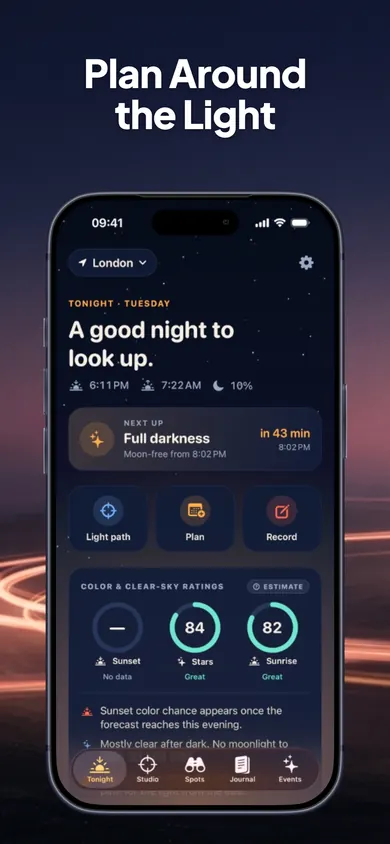
- 1Tonight's Sunset, Stars and Sunrise ratings, with plain-English reasons.
- 2Hour-by-hour low, mid and high cloud from MET Norway, plus point forecasts 60 km and 180 km toward the setting Sun, where low cloud can cut off the light.
 3
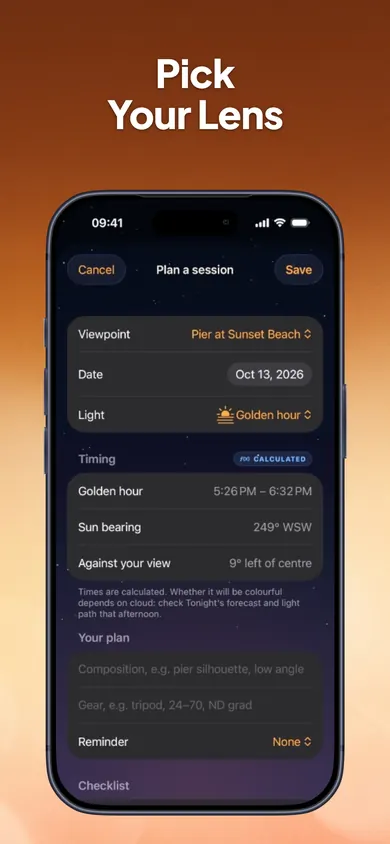
- 3Plan a session for golden hour, sunset or blue hour, with the timing, sun bearing and how far it sits from the center of your frame. Add gear, notes and a reminder.
 4
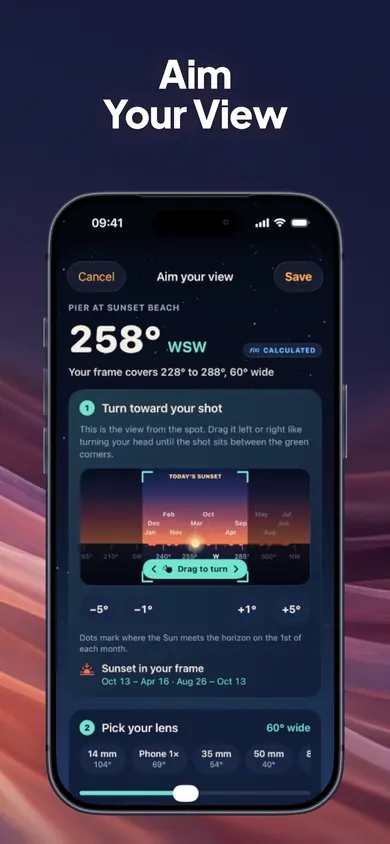
- 4Pick your lens, 14 mm to 200 mm or your phone's camera, and the first-person horizon widens or narrows to match, so you know if the sun lands in frame.
One design decision we made on purpose: calculated, forecast, estimated and observed data are labelled differently, so you always know which numbers are math and which are a guess. After sunset you can rate what you saw in two taps; after three check-ins, the color ratings adjust to your own sky in small, capped steps.
Right settings. Right minute.
Tonight's sunset rating, cloud toward the sun, and where it will set from your exact spot.
Free includes the Studio, aiming and plans for 2 viewpoints, the journal and tonight's ratings. Asterfold Plus is optional.